
Antsle Forum
Welcome to our Antsle community! This forum is to connect all Antsle users to post experiences, make user-generated content available for the entire community and more.
Please note: This forum is about discussing one specific issue at a time. No generalizations. No judgments. Please check the Forum Rules before posting. If you have specific questions about your Antsle and expect a response from our team directly, please continue to use the appropriate channels (email: [email protected]) so every inquiry is tracked.
Windows Desktop 2 CPU max

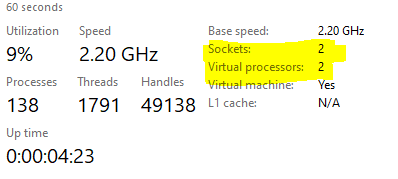
Quote from John S on October 11, 2019, 7:11 pmDid anyone notice that somehow we lost the ability to have more than 2 cores. Well, 2 cores and # of threads with a Windows 10 pro installation? I can see the processors in the device manager, but task manager keeps saying 2 sockets, 2 VPUs. I'm assuming I need to do something in the background, but sadly I'm a VMWare jockey in most places so still trying to learn. Any suggestions?
I saw @ac9hp ran into a similar issue in his thread: https://antsle.com/forum/topic/configure-cpu-for-windows/
He adjusted the settings by tweaking the msconfig side of the house. In my case, I need to adjust the configuration of the vim I think.
Did anyone notice that somehow we lost the ability to have more than 2 cores. Well, 2 cores and # of threads with a Windows 10 pro installation? I can see the processors in the device manager, but task manager keeps saying 2 sockets, 2 VPUs. I'm assuming I need to do something in the background, but sadly I'm a VMWare jockey in most places so still trying to learn. Any suggestions?
I saw @ac9hp ran into a similar issue in his thread: https://antsle.com/forum/topic/configure-cpu-for-windows/
He adjusted the settings by tweaking the msconfig side of the house. In my case, I need to adjust the configuration of the vim I think.
Uploaded files:



Quote from lancem on October 14, 2019, 1:21 pmI had a similar thing happen (although I don't remember if I had created the antlet from a blank-kvm template or some other Win10 template).
I stopped the antlet, then edited the definition directly (from the antsle command line as root using virsh edit antletname). In that file, you can find a section about CPUs and I was able to set it to 1 Socket, 1 Core, 8 threads (or whatever you need):
In my case, since I wanted 8 cores:
<vcpu placement='static'>8</vcpu>
Then further down a little, there's this section:
<cpu mode='custom' match='exact' check='partial'>
<topology sockets='1' cores='1' threads='8' />
I had a similar thing happen (although I don't remember if I had created the antlet from a blank-kvm template or some other Win10 template).
I stopped the antlet, then edited the definition directly (from the antsle command line as root using virsh edit antletname). In that file, you can find a section about CPUs and I was able to set it to 1 Socket, 1 Core, 8 threads (or whatever you need):
In my case, since I wanted 8 cores:
<vcpu placement='static'>8</vcpu>
Then further down a little, there's this section:
<cpu mode='custom' match='exact' check='partial'>
<topology sockets='1' cores='1' threads='8' />

Quote from dill731 on November 23, 2019, 9:58 amSame issue here, I do not see the <topology sockets='1' cores='1' threads='8' /> did you add that?
Same issue here, I do not see the <topology sockets='1' cores='1' threads='8' /> did you add that?
Quote from lancem on November 23, 2019, 12:28 pmI didn't add it, but I had to change the numbers.
Here are the first lines in my XML showing the vcpu and cpu sections
<domain type='kvm'>
<name>win-terminal1</name>
<uuid>96f437d5-9a07-4bq4-8xxc-1e1831xx8a9f</uuid>
<memory unit='KiB'>8388608</memory>
<currentMemory unit='KiB'>8388608</currentMemory>
<vcpu placement='static'>4</vcpu>
<os><type arch='x86_64' machine='pc-i440fx-2.4'>hvm</type>
<boot dev='hd'/></os>
<features><acpi/>
<apic/>
<vmport state='off'/></features>
<cpu mode='custom' match='exact' check='partial'><model fallback='allow'>Westmere</model>
<topology sockets='1' cores='1' threads='4'/></cpu>
<clock offset='localtime'><timer name='rtc' tickpolicy='catchup'/>
<timer name='pit' tickpolicy='delay'/>
<timer name='hpet' present='no'/></clock>
<on_poweroff>destroy</on_poweroff>
<on_reboot>restart</on_reboot>
<on_crash>restart</on_crash>
I didn't add it, but I had to change the numbers.
Here are the first lines in my XML showing the vcpu and cpu sections
<domain type='kvm'>
<name>win-terminal1</name>
<uuid>96f437d5-9a07-4bq4-8xxc-1e1831xx8a9f</uuid>
<memory unit='KiB'>8388608</memory>
<currentMemory unit='KiB'>8388608</currentMemory>
<vcpu placement='static'>4</vcpu>
<os>
<type arch='x86_64' machine='pc-i440fx-2.4'>hvm</type>
<boot dev='hd'/>
</os>
<features>
<acpi/>
<apic/>
<vmport state='off'/>
</features>
<cpu mode='custom' match='exact' check='partial'>
<model fallback='allow'>Westmere</model>
<topology sockets='1' cores='1' threads='4'/>
</cpu>
<clock offset='localtime'>
<timer name='rtc' tickpolicy='catchup'/>
<timer name='pit' tickpolicy='delay'/>
<timer name='hpet' present='no'/>
</clock>
<on_poweroff>destroy</on_poweroff>
<on_reboot>restart</on_reboot>
<on_crash>restart</on_crash>
Quote from dill731 on November 23, 2019, 8:07 pmodd, i do not have that. Thank You for posting yours, i may try and add it and see what happens
odd, i do not have that. Thank You for posting yours, i may try and add it and see what happens