
Antsle Forum
Welcome to our Antsle community! This forum is to connect all Antsle users to post experiences, make user-generated content available for the entire community and more.
Please note: This forum is about discussing one specific issue at a time. No generalizations. No judgments. Please check the Forum Rules before posting. If you have specific questions about your Antsle and expect a response from our team directly, please continue to use the appropriate channels (email: [email protected]) so every inquiry is tracked.
antlets - DEGRADED

Quote from cwodrsret on August 23, 2020, 5:18 amMorning,
After a reboot this morning on my antsle, I am getting in the zpool section: antlets - DEGRADED Does this mean that a hard drive is going bad or is there some maintenance that I can run. I have
1 x 250 GB HDD1 x 2 TB HDD4 x 3 TB HDDAll configured in 1 big zpool (Not Mirroring)I hope someone can give me some direction on how to correct this!ThanksRandy Spencer
Morning,
After a reboot this morning on my antsle, I am getting in the zpool section: antlets - DEGRADED Does this mean that a hard drive is going bad or is there some maintenance that I can run. I have

Quote from lancem on August 24, 2020, 11:38 amYou can type:
zpool status antlets
to see why it's degraded.
It may be a bad drive or could be something else.
When I reboot, I have an external pool that sometimes doesn't get mounted properly.
You can try:
zpool export antlets
then
zpool import antlets
to see if it will mount correctly.
I would also recommend taking advantage of either the mirroring or striping capabilities of zfs (which does reduce the amount if usable space, but it helpful when a drive dies).
You can type:
zpool status antlets
to see why it's degraded.
It may be a bad drive or could be something else.
When I reboot, I have an external pool that sometimes doesn't get mounted properly.
You can try:
zpool export antlets
then
zpool import antlets
to see if it will mount correctly.
I would also recommend taking advantage of either the mirroring or striping capabilities of zfs (which does reduce the amount if usable space, but it helpful when a drive dies).
Quote from cwodrsret on August 24, 2020, 11:41 amI will try that and let you know. BTW this ticket is related to
https://antsle.com/forum/topic/sda3-full/
Thanks
Randy Spencer
I will try that and let you know. BTW this ticket is related to
https://antsle.com/forum/topic/sda3-full/
Thanks
Randy Spencer
Quote from cwodrsret on August 24, 2020, 4:35 pmOK ran a du -H /var/log and I like said before nothing really big! Did a zpool status antlets -v and got the following info attached. I think the culprit is highlighted in yellow. Could this cause the system to go down? If I delete this file will it all come back? Would this cause /dev/sda3 to get full. Also Like I said the system has the following:
1 x 250 GB HDD1 x 2 TB HDD4 x 3 TB HDDI did the install on the 250GB HDD and the I added the 2TB and 4 3TB to the zpool for one massive zpool, was this a mistake?I appreciate any direction/advice on how to get this system back up and running, I really don't want to have to start from scratch.ThanksRandy Spencer
OK ran a du -H /var/log and I like said before nothing really big! Did a zpool status antlets -v and got the following info attached. I think the culprit is highlighted in yellow. Could this cause the system to go down? If I delete this file will it all come back? Would this cause /dev/sda3 to get full. Also Like I said the system has the following:
Uploaded files:
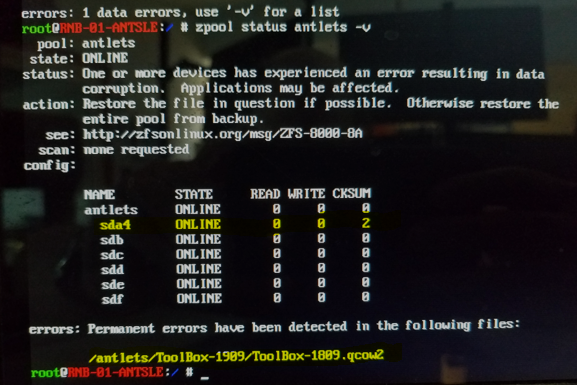
Quote from cwodrsret on August 24, 2020, 4:47 pmOk, I went ahead and deleted the ToolBox-1809.qcow2 file and rebooted, still nothing here is what I get at the logon attached. Still looks like there is some disk full somewhere. I am at a lost.
Thanks
Randy Spencer
Ok, I went ahead and deleted the ToolBox-1809.qcow2 file and rebooted, still nothing here is what I get at the logon attached. Still looks like there is some disk full somewhere. I am at a lost.
Thanks
Randy Spencer
Uploaded files:

Quote from cwodrsret on August 24, 2020, 5:29 pmOk I am back up and running now, I finally found the culprit hogging up the space /var/crash had a couple of directories that had 1 4.5 and 5GB files and 1 9GB that is why /dev/sda3 was full. After deleting those files everything booted up find and I am back up and running again. Thanks lacem for getting me poking around some more!
Thanks
Randy Spencer
Ok I am back up and running now, I finally found the culprit hogging up the space /var/crash had a couple of directories that had 1 4.5 and 5GB files and 1 9GB that is why /dev/sda3 was full. After deleting those files everything booted up find and I am back up and running again. Thanks lacem for getting me poking around some more!
Thanks
Randy Spencer